Photosmith3.1.1
Publisher Description
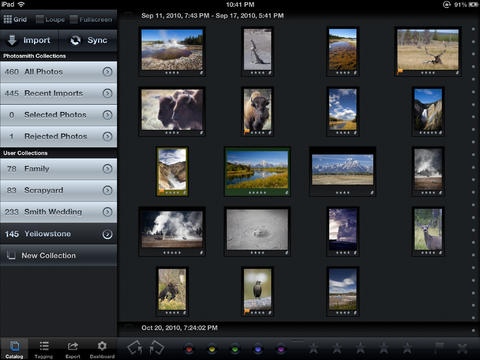
Sync photos directly to Lightroom with no monthly cloud costs. Organize your photography collection on the go. View and edit IPTC metadata right on your iPad: Star ratings, keywords, location, copyright, and much more. Export to Flickr, Facebook, Dropbox or Email, with all your metadata embedded.
Photosmith lets you do a lot of the things [that] I think are the most desirable for Lightroom on the iPad. Leo Laporte / iPad Today Episode 148
Got an iPad? Use Adobe Lightroom to organize and mess with your Photos? Then prepare to get excited. Charlie Sorrel / Wired
Photosmith is a solid app. If you re in that market, and if you think the iPad fits in [your workflow] ... Photosmith totally rocks. Matt Kloskowski / The Grid Episode 64
Ditching superfluous gear is great. Photosmith will lighten your photographic load, iPad- loading pics straight from your camera. Sam Biddle / Gizmodo
For me it means I can meet clients anywhere, and do a shoot review making selects at a place that suits them, but without the theatrics of setting up a computer/laptop. Sean McCormack / lightroom-blog.com
* * *
The best time to tag your photos is right after you make them, while your memory is still fresh. Capture thoughts and associate them with your photos on iPad; then later sync everything with your Lightroom catalog, at your convenience.
KEY FEATURES
Native camera raw processing. The fastest native camera raw processing available on iPad
View, edit, then sync metadata with Lightroom: Keywords, pick/reject flags, description, location, and much more.
Touch-optimized keywording.
Automatic groupings of similar photos with Smart Groups (patent pending)
Apply metadata individually, in groups, or with user-defined presets
Sort and filter your photos by flags, stars, color labels, dates and filenames
Export to Facebook, Flickr, Dropbox, email, and iPad Albums
View JPG and camera raw photos with 200% zoom
Import photos wirelessly with Eye-Fi and FTP
Import photos through USB using iTunes
Very robust and configurable Lightroom sync options, accommodating many digital photography workflows
Photosmith is not an image manipulation tool, and cannot adjust photo exposure, crop, or color temperature. However, you may edit photos using any of the wonderful image editing apps available, then import them right into Photosmith for organizing and storage.
Camera File Format Support
JPG: Complete support for both image viewing and metadata
Native camera raw rendering for the following camera formats: CR2, NEF, ORF, PEF, NRW, SRF, CRW, RAF, RW2, DNG, SRW, RAW, MOS, ERF, MRW, KDC, 3FR, ARW, DC2, DCR, FFF, HDR, K25, KC2, MDC, MEF
* For a comprehensive list of all tested camera raw filetypes, please visit photosmithapp.com/cameras
Requirements
iPad 3 or newer strongly recommended
iOS 5.1 or higher
Apple Camera Connection Kit (only needed when importing images directly from your camera or memory card)
Adobe Photoshop Lightroom 4.0 or higher
Photosmith Lightroom plugin --- A free download from photosmithapp.com
Wi-Fi connection to your Mac or PC during Lightroom sync
Support
Photosmith was created by a small team of avid photographers. We take customer feedback very seriously and welcome your interaction and discussion.
While every effort has been made to ensure that Photosmith sync just works, you may still have questions. Photosmith offers extensive in-app help, and you may contact us directly from within the app.
We also maintain a User Guide as a PDF and individual Knowledge Base articles - both are at support.photosmithapp.com
For a complete list of features and videos, please visit photosmithapp.com
Requires iOS 5.1 or later. Compatible with iPad.
About Photosmith
The company that develops Photosmith is C Squared Enterprises, Inc. The latest version released by its developer is 3.1.1.
To install Photosmith on your iOS device, just click the green Continue To App button above to start the installation process. The app is listed on our website since 2011-04-26 and was downloaded 15 times. We have already checked if the download link is safe, however for your own protection we recommend that you scan the downloaded app with your antivirus. Your antivirus may detect the Photosmith as malware if the download link is broken.
How to install Photosmith on your iOS device:
- Click on the Continue To App button on our website. This will redirect you to the App Store.
- Once the Photosmith is shown in the iTunes listing of your iOS device, you can start its download and installation. Tap on the GET button to the right of the app to start downloading it.
- If you are not logged-in the iOS appstore app, you'll be prompted for your your Apple ID and/or password.
- After Photosmith is downloaded, you'll see an INSTALL button to the right. Tap on it to start the actual installation of the iOS app.
- Once installation is finished you can tap on the OPEN button to start it. Its icon will also be added to your device home screen.
